Pace Report
The Pace report allows users to track the pace or pick up to assess the expected booking and revenue for a certain stay period on a particular date or for a specific date range. Perform the following steps to generate the report:
Navigate to Reports ➜ Dynamic Reports ➜ Manager ➜ Pace.
Refer to the following table and fill in the fields.
|
Field |
Description |
|---|---|
|
Report Name |
|
|
Property |
The property associated with the reservation |
|
Booked As Of |
The list of reservations made as of the selected date to calculate the rooms sold, revenue, etc., for the selected date range as of this date. |
|
Pace |
Select the pace of the booking, revenue, etc., for the past ‘X’ days from the ‘Booked As of’ date for the selected date range. |
|
Start Date |
The date from which the report must be generated |
|
End Date |
The end date until when the report must be generated |
|
Grouped By |
Select to group the report data to be displayed. |
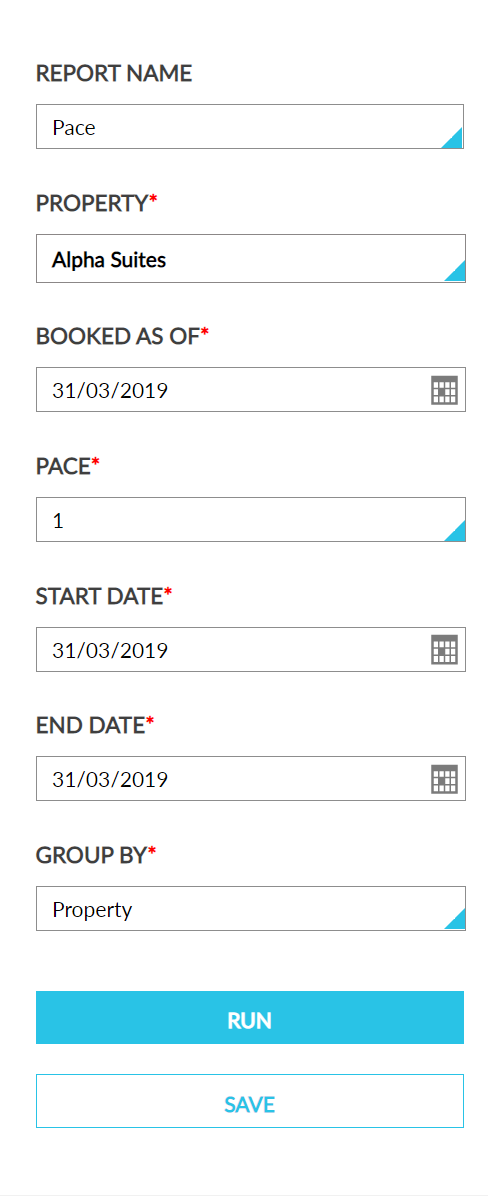
Click Run to generate the report.
Click Save to save the report under User Favorites section.
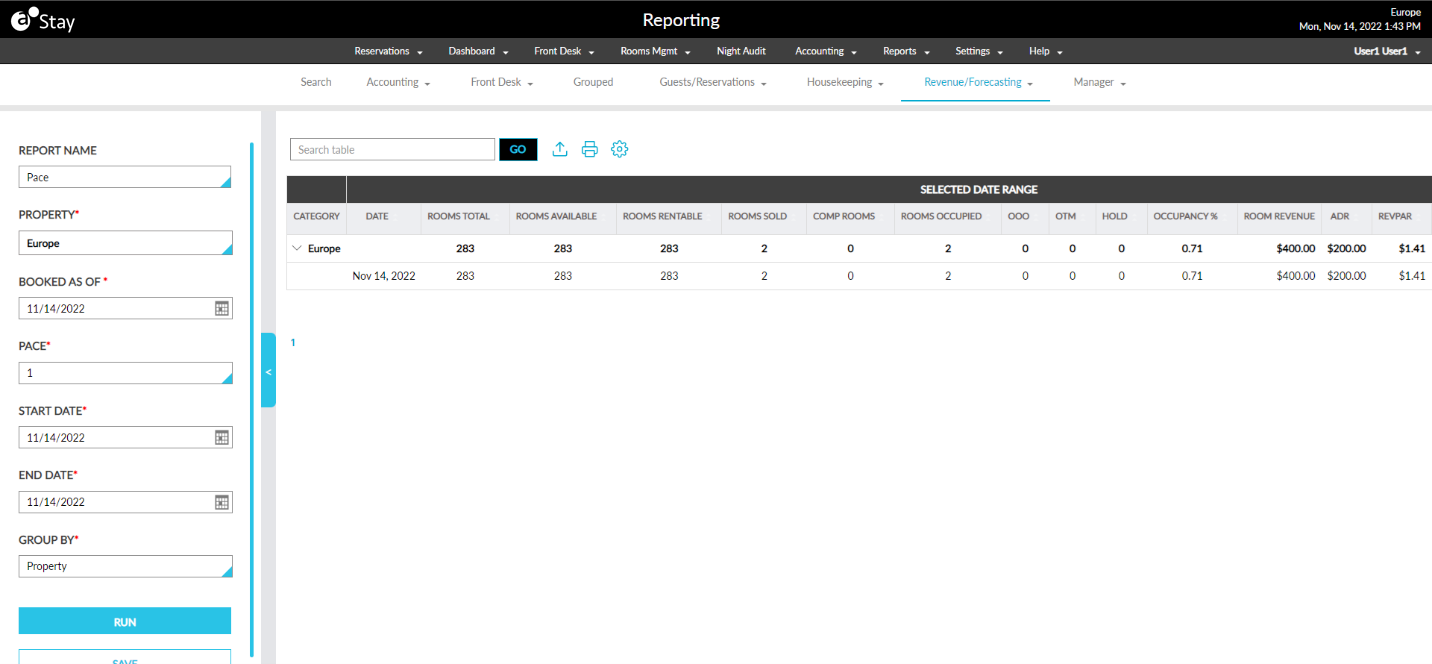
Sample Report
Report Fields
This report displays the following fields:
|
Field |
Description |
|---|---|
|
Selected Date Range |
|
|
Date |
The date for the report to be generated. |
|
Rooms Total |
The total number of rooms configured in the property for the selected date range. |
|
Rooms Available |
The total rooms available in the property for the selected date range. |
|
Rooms Rentable |
The rooms available for rent in the property for the selected date range. |
|
Room Revenue |
The room revenue for the selected date range for the date selected in the Booked As Of field. |
|
Rooms Sold |
The rooms reserved for the selected date range for the date selected in the Booked As Of field not including comp rooms. |
|
Comp Rooms |
The number of rooms reserved as comp rooms for the selected date range for the date selected in the Booked As Of field. |
|
Rooms Occupied |
The sum of rooms sold and rooms comped for the selected date range for the date selected in the Booked As Of field. |
|
OOO |
The total number of rooms with the OOO status in an inventory block for the selected date range for the date selected in the Booked As Of field. |
|
OTM |
The total number of rooms with the OTM status in an inventory block status as Off The Market for the selected date range for the date selected in the Booked As Of field. |
|
Hold |
The total number of rooms with the Hold status in an inventory block status as Hold for the selected date range for the date selected in the Booked As Of field. |
|
Occupancy % |
The percentage of occupancy for the selected date range for the date selected in the Booked As Of field. |
|
ADR |
The Average Daily Rate for the room. |
|
RevPAR |
Revenue Per Available for the room. |
|
Room Revenue Pick Up |
The difference in room revenue for the selected date of the current year and the previous year for the date selected in the Booked As Of field. |
|
Pick Up |
The difference in rooms sold for the selected date of the current year and the previous year for the date selected in the Booked As Of field. |
|
Year Over Year |
|
|
Date |
The date for the report to be generated. |
|
Rooms Total |
The total number of rooms configured in the property for the selected date range for the previous year. |
|
Rooms Available |
The total rooms available in the property for the selected date range for the previous year. |
|
Rooms Rentable |
The rooms available for rent in the property for the selected date range for the previous year. |
|
Room Revenue |
The room revenue for the selected date range for the date selected in the Booked As Of field for the previous year. |
|
Rooms Sold |
The rooms reserved for the selected date range for the previous year for the date selected in the Booked As Of field without comp rooms |
|
Comp Rooms |
The number of rooms reserved as comp rooms for the selected date range for the previous year for the date selected in the Booked As Of field. |
|
Rooms Occupied |
The sum of rooms sold and comp rooms for the selected date range from for the previous year for the date selected in the Booked As Of field. |
|
OOO |
The total number of rooms with inventory block status as Out Of Order for the selected date range from for the previous year for the date selected in the Booked As Of field. |
|
OTM |
The total number of rooms with inventory block status as Off The Market for the selected date range from for the previous year for the date selected in the Booked As Of field. |
|
Hold |
The total number of rooms with inventory block status as Hold for the selected date range from for the previous year for the date selected in the Booked As Of field. |
|
Occupancy % |
The percentage of occupancy for the selected date range from for the previous year for the date selected in the Booked As Of field. |
|
ADR |
The Average Daily Rate for the room for the previous year. |
|
RevPAR |
Revenue Per Available for the room for the previous year. |
|
Room Revenue Pick Up |
The increase or decrease in rooms revenue for that date as of the Booked as of date compared to the previous year. |
|
Pick Up |
The increase or decrease in rooms sold for the selected date range as of the ‘Booked as of ‘date compared to the previous year. |
|
Pace |
|
|
Room Revenue Pick Up |
The room revenue for the selected date range for the past X days from the Booked As Of date. X is the pace days. |
|
Pick Up |
The total no. of rooms sold for the selected date range section for the past X days from the ‘Booked As Of’ date. X is the pace days. |
|
ADR |
The average daily rate for that date in the Selected Date Range section. |
|
RevPAR |
The revenue per available room for that date in the Selected Date Range section. |